Article
Fraud Defense Issue Resolution Guide
This guide assists users in resolving Fraud Defense Issues detected in emails and establishes protocols for implementing security best practices to reduce the overall risk of financial fraud. The resolution process is segmented into four primary stages: Review, Investigate, Mitigate, and Monitor, concluding with the formal resolution procedure, Mark as Resolved.

1. Review
Review the flagged email notification within Stance, which contains critical data points necessary for initial assessment:
- Subject: The email’s subject line.
- Date: The timestamp when the email was received.
- From: Sender’s email address.
- To: Recipient(s) of the email.
- Reasons for Flagging: The specific criteria that triggered the flag (e.g., Suspicious Email Subject, Employee Impersonation).
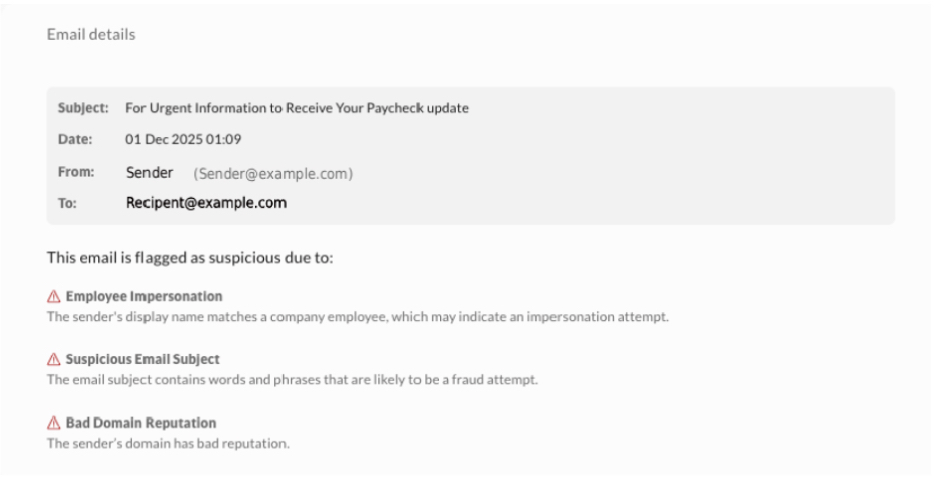
Note: The “cc” field is not currently displayed but will be added in a future update. During this phase, users can move between flagged email messages one by one using the Next/Previous buttons, or exit the view without making changes using the Cancel button.
2. Investigate
Analysis of suspicious emails is necessary to understand their impact.
2.1. Assessment and Analysis
Assess Severity, noting that higher severity levels indicate increased urgency and potential risk. Examine the email’s content, sender, and metadata to understand its potential impact.
2.2. Verification and Risk Identification
Verify Sender Legitimacy by confirming with the finance or IT security team whether the sender is from a trusted source. To ensure Sender Reliability, contact the alleged sender directly through a trusted communication method outside of the suspicious email thread (e.g., calling the organization’s official number). Determine if the email requests sensitive data, user credentials, or financial transactions; financial emails pose a higher business risk.
2.3. Exposure and Interaction Check
Evaluate Internal Exposure by assessing how widely the email was distributed within the organization. Check Employee Interaction to verify whether any employees engaged with the email, such as clicking links or opening attachments. If multiple users are involved, notify affected users about the flagged email, warn them not to interact with it, and share next steps.
3. Mitigate
Implement appropriate corrective actions based on the investigation’s findings.
3.1. Remediation for Fraudulent Emails
If the email is confirmed to be fraudulent, take immediate action:
- Notify All Recipients: Inform them not to open attachments, click on links, or engage with the sender.
- Remove the Email: Ensure it is deleted from all inboxes.
- Report the Phishing Attempt: Use Outlook’s “Report Phishing” feature.
- Block the Sender & Domain: Prevent further emails from the malicious source.
- Forward to the Security Team: Share the email for further investigation if it poses significant concerns or impacts sensitive data.
- Strengthen Security: Enable Multi-Factor Authentication (MFA) and reset affected passwords.
4. Mark as Resolved
This section details the procedure for closing the issue after review and mitigation have been completed.
To mark an issue as resolved within the Stance platform, locate the specific item using either the My Stance dashboard or the Fraud Defense module.
- Locate the Issue Log in to Stance and proceed with one of the following navigation methods:
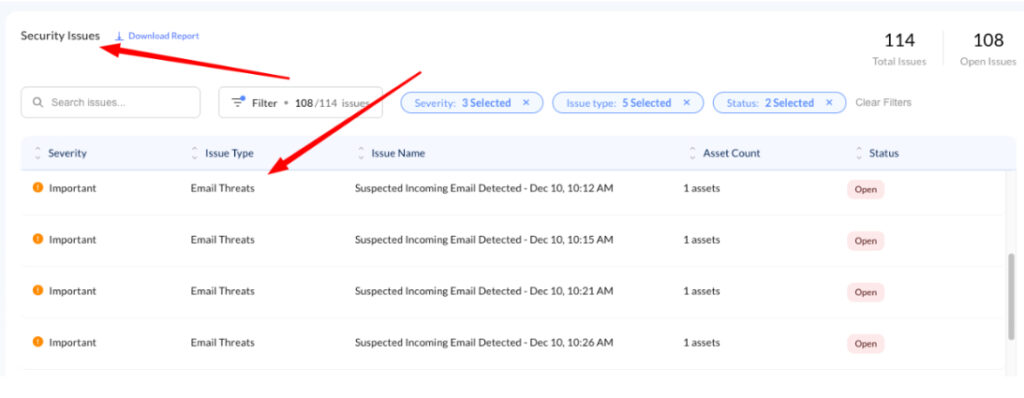
- Method A: My Stance Dashboard Navigate to the My Stance page. Locate the Security Issue Table and identify the issue labeled “Email Threats” in the Issue Type column.
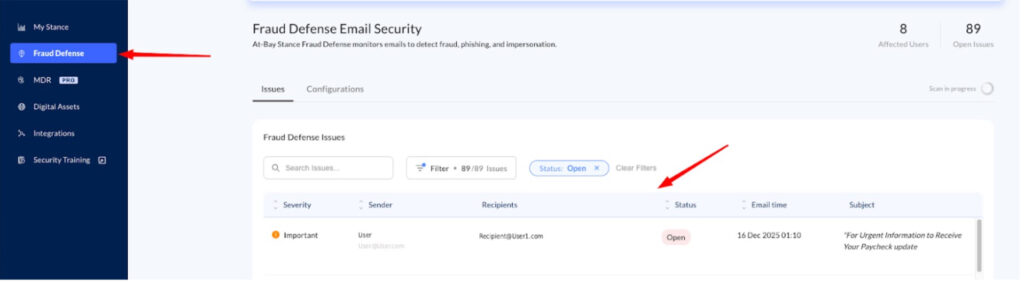
- Method B: Fraud Defense Module Select Fraud Defense from the left-hand navigation menu. Locate the specific issue within the Fraud Defense Issue Table
- Resolve the Issue
- Click on the specific issue row. A context menu will appear on the right side of the screen displaying issue details.
- Locate and click the Mark as resolved button at the bottom of the panel to finalize the resolution.
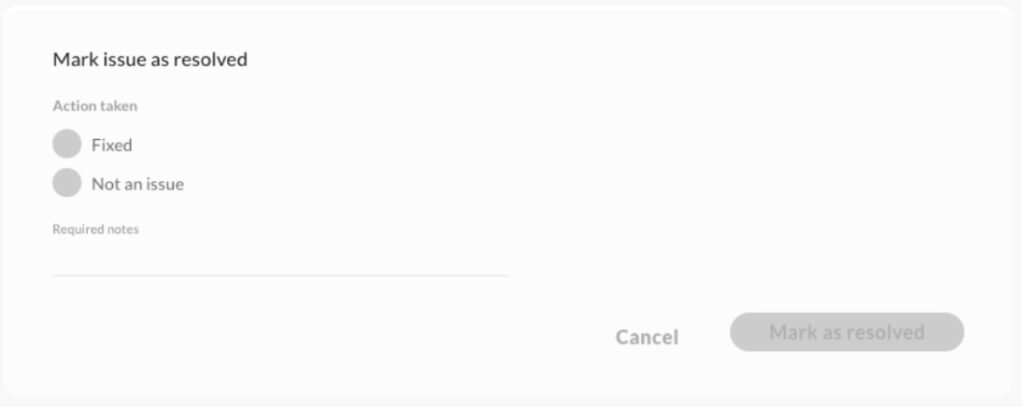
The status of the resolution depends on the investigation’s outcome:
- If Fraudulent: Mark the issue as “Resolved” in Stance after implementing all necessary corrective actions.
- If Legitimate: Mark the issue as “Not an Issue” in Stance. This designation may be chosen if:
- The email is from a trusted source, meaning the sender is verified, and the email content is legitimate.
- The email is unlikely to be harmful, as analysis shows no significant indicators of fraud, and it aligns with legitimate communication patterns.
- The email was found, and users were notified (located, assessed, and communicated with impacted users as required).
It is essential to keep records of resolved issues, documenting why they were flagged and how they were addressed; this builds an audit trail for compliance and helps improve future detection accuracy.
5. Monitor
Sustained security requires continuous post-incident tracking.
Track Impacted Mailboxes by continuously monitoring for any unusual activity or suspicious behavior. Enhance Employee Awareness by providing phishing awareness training and reinforcing email security best practices. Protecting the organization starts with awareness, which can be enhanced by enabling the Security Awareness Training feature on the platform for free to help employees recognize and respond to email-based threats.
Conclusion
By diligently following these steps, users can effectively mitigate financial fraud risks and maintain a secure email environment. If you have additional questions, contact the support team at security@at-bay.com or via intercom chat.